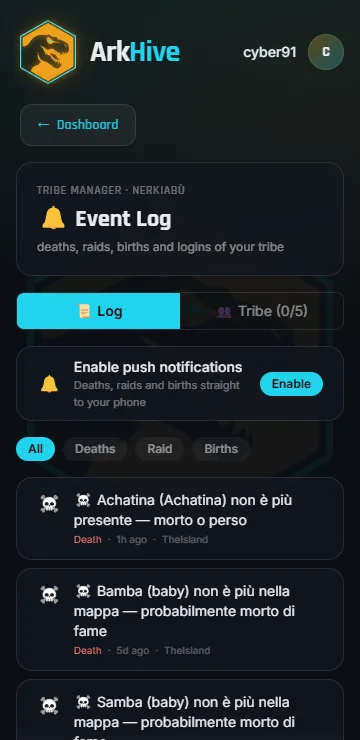
Tribe Log Guide: How to Read and Understand Every Event in ASA
The tribe log is the only place in ARK: Survival Ascended that tells you what happened while you were logged off. Everything else in the game shows you the present: what is alive now, what is standing now. The log shows the past, and the past is where the answers are.
Most players open it, see a wall of lines, scroll for two seconds and close it. That is a mistake, because almost every question that matters has its answer in there. Who let the gate open. Whether last night was a raid or a wandering Rex. Which of the twelve babies starved, and at what time. Whether the tribemate who left took anything with them.
This page explains what each category of entry means, how to read a sequence rather than a single line, and where the in-game log stops being enough.
Where the log lives, and what it actually is
You reach it from the tribe manager in game. What you get is a chronological list of events the server recorded for your tribe only: every line is stamped with the in-game day and time it happened.
Two things about it are worth understanding before anything else.
It is server-side, not client-side. Events are recorded whether or not you were online, whether or not you were on that map. This is why the log is the only honest witness to a night raid.
It is a rolling window, not an archive. The log keeps a limited number of recent entries and drops the oldest as new ones arrive. On a busy tribe, a quiet weekend of yours can be enough for the interesting lines to fall off the end before you ever read them. Nothing warns you that it happened, and there is no way to recover what rolled off.
That second point is the one that costs people the most, and we come back to it at the end.
The categories of event
Different builds and settings phrase things differently, so rather than quoting exact sentences, here is what each kind of entry is telling you.
Tribe membership
Someone joined the tribe, left it, was removed, or had their rank changed.
These are the entries people skip and later wish they had not. A member leaving is normal. A member leaving twenty minutes after a pile of items disappeared is a different story, and the log is what lets you put those two facts in the same timeline. Rank changes matter for the same reason: whoever can promote can also unlock what a rank protects.
Taming
A tribe member tamed a creature. The entry carries who did it, what it is, and its level.
Useful for two things that have nothing to do with nostalgia: knowing whether the high-level tame you were told about actually happened, and reconstructing when a creature entered the tribe when you later find it unclaimed or missing.
Births and hatching
A baby was born or an egg hatched.
This is the entry that starts a clock. From that moment there is a creature that needs food in a trough and needs imprinting at intervals, and if nobody is online at the right time it dies. The log tells you the birth happened. It does not tell you the baby is now hungry. That gap is exactly where most breeding losses come from.
Deaths
The single most important category, and it splits in two.
A tribe member died. The entry names the player and what killed them: a creature, another player, the environment. Being killed by another player is the strongest early signal you have that someone hostile is inside your area.
A tame died. Same structure: which creature of yours, and what killed it.
Read these by cause, not one at a time. Ten tames dying to wild creatures over a week is attrition. Three tames dying inside two minutes, to a player, is the opening of a raid.
Structures destroyed or demolished
Something you built stopped existing. Two very different reasons produce entries here: a tribe member demolished it deliberately, or it was destroyed by someone or something.
Sequence is everything. A single destroyed structure at the edge of the base is usually a wild creature that wandered in. A run of destroyed structures, in a short window, moving inward, is somebody coming through your walls.
Claiming and unclaiming
A creature changed hands: claimed by your tribe, or unclaimed and therefore released to anyone who walks up to it.
Unclaim entries deserve a second look every time. Unclaiming is how a leaving member takes value out of a tribe without ever appearing in a transfer, and it is how a good creature is lost to a passing stranger with no fight at all.
Transfers between maps
A creature or items were uploaded or downloaded across the cluster.
On a multi-map cluster this is the entry that explains an empty cryo fridge with no death to match it. Uploads leave the map. If you cannot find something and there is no death entry for it, look for a transfer before you assume a bug.
Reading a raid instead of a line
A raid almost never shows up as one entry. It shows up as a shape, and once you have seen the shape you recognise it immediately:
- turrets and outer structures start taking damage or getting destroyed
- tames stationed outside die, usually within a couple of minutes of each other
- structures fall in sequence, from the perimeter toward the vault room
- players of the tribe die, if anyone was online
- it stops
What you want from the log afterwards is not the list of losses. It is the timestamps. The gap between the first destroyed structure and the last one tells you how long they were inside. The point where the sequence jumps from outer walls to the core tells you where the defence actually failed. And the very first entry tells you the time of night your base is worth watching.
Compare that first timestamp across several raids and you usually find a pattern: the same window, the same day, because raiders come back when they know nobody is awake.
Where the in-game log stops
Everything above assumes you are in game, at the terminal, reading. That assumption is the problem, and it has four parts.
You have to be playing to know. The log does not come to you. A raid at three in the morning is discovered at nine, six hours after anything could have been done about it.
It rolls over. Busy tribe, few days away, and the entries you needed are gone.
It is one tribe on one screen. Multi-map clusters mean opening the log again, elsewhere, to see the rest.
It records, it does not warn. A birth entry is written, and nothing tells you six hours later that the baby has not eaten.
What ArkHive does with it
This is the exact gap ArkHive was built to close, and the reason the tribe log sits at the centre of the app rather than off to the side.
ArkHive reads the real data from your server, not estimates, and turns the stream of events into something you can actually use from your phone:
- Events, sorted by type. Every event is classified as a birth, a death, a member joining, a raid, or a general log entry, so you can filter to what you are looking for instead of scrolling past everything else.
- Push notifications. The categories that cannot wait, raids above all, reach your phone when they happen instead of when you next log in. Configurable per tribe, so a big tribe does not drown in alerts.
- It keeps working while you do not. Offline, asleep, at work: the server keeps producing events and the app keeps reading them.
- The whole cluster at once. All your maps in one list, instead of one log screen per map.
On top of the log itself sit the alarms that come from the same live data: babies going hungry, troughs running dry, ammunition and fuel running out. The log tells you the baby was born. ArkHive tells you it is about to starve, which is the part that actually saves it.
Connecting a server takes one command in the admin console. No programs to install, no PC left running, and it works on Nitrado and G-Portal too.